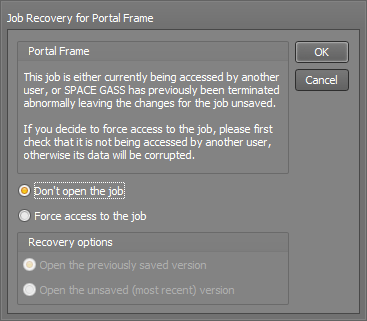
If you get the above Job Recovery form each time you try to start SPACE GASS, it is probably due to SPACE GASS crashing after the job is loaded, leaving the job open and triggering the Job Recovery process each time you try again. It happens commonly with the Portal Frame job because that is the default job that is opened when SPACE GASS is first installed.
You should choose "Force access to the job", click Ok, and then see if SPACE GASS starts successfully. If it crashes or just shuts down then that is the cause of the problem rather than the job recovery being the issue. You should take notice of any error messages that might appear after the job recovery form to see if they give a clue about what the problem is.
In order to find the solution you should refer to the various items elsewhere on this page that deal with out-of-date graphics card drivers, SPACE GASS crashing or SPACE GASS failing to start. One of them is likely to be the root cause of the problem.
Was this article helpful?
That’s Great!
Thank you for your feedback
Sorry! We couldn't be helpful
Thank you for your feedback
Feedback sent
We appreciate your effort and will try to fix the article