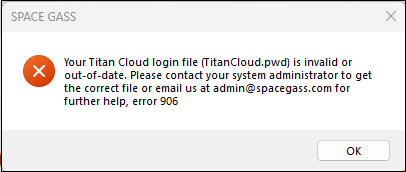
This type of error indicates that Windows may be providing a folder location that contains an invalid/out of date TitanCloud.pwd login file, despite you providing a valid file on registration.
Some Windows configurations are set to use a hidden 'Virtual Store'. With these 'Virtual Stores', there can be two locations of the C:\ProgramData folder that we use to access the login file.
- You will first need access to Windows hidden folders, C:\ProgramData (NOT C:\Program Files) and C:\Users\\AppData. Refer to Windows help page View hidden files and folders in Windows
- Navigate to your "C:\ProgramData\SPACE GASS" folder and manually delete the TitanCloud.pwd file if it exists in this folder.
- Navigate to your "C:\Users\YourUserName\AppData\Local\VirtualStore\ProgramData\SPACE GASS" folder and if it exists, manually delete the TitanCloud.pwd file if it exists in this folder.
- Run SPACE GASS and it should now display that it is unregistered.
- Register SPACE GASS with your provided login file or username/password obtained from your licence administrator. Refer Titan Cloud System for detailed instructions.
Was this article helpful?
That’s Great!
Thank you for your feedback
Sorry! We couldn't be helpful
Thank you for your feedback
Feedback sent
We appreciate your effort and will try to fix the article