This happens because Windows is referring an out-of-date version of an Intel component to SPACE GASS. It could be triggered by a SPACE GASS upgrade or if another program has installed an out-of-date version of the Intel component. The solution is to restore the up-to-date file using the following procedure:
- Shut down SPACE GASS.
- Navigate to your "C:\Program Files\SPACE GASS 14.2" folder and locate the two MSI files that have names starting with "ww_ifort_redist..."
- Double-click on each of these to manually re-install them.
- SPACE GASS should now run without the error.
If the problem persists then follow the additional steps below:
- Uninstall SPACE GASS.
- Navigate to your "C:\Program Files" folder and delete the "SPACE GASS 14.2" folder if it still exists there.
- Start Windows "Control Panel", select "Programs and Features" and uninstall all versions of the "Intel(R) Visual Fortran Redistributable..." files that are listed there.
- Navigate to your "C:\Program Files (x86)\Common Files\Intel" folder and delete all the folders inside.
- Navigate to your "C:\Windows\sysWow64" folder and rename the LIBIOMP5MD.dll file to LIBIOMP5MD.old if it exists there.
- Reinstall SPACE GASS by right-clicking on its installation file and selecting "Run as Administrator".
- SPACE GASS should now run without the error.
If the problem persists then follow the additional steps below:
- Click here to download a program called Dependency Walker.
- Unzip the downloaded file into a temporary folder and then from that temporary folder run a program called “depends.exe”.
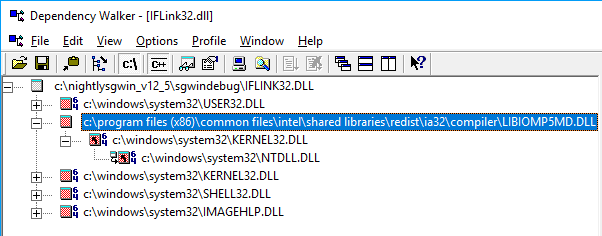
- When it is running, click its open button, navigate to your “C:\Program Files\SPACE GASS 14.2” folder and open the file called IFLink32.dll.
- Dependency Walker will scan your system for a minute or so and then say that there were some errors. Just click Ok to ignore those errors.
- Look near the top of the results for a file called LIBIOMP5MD.dll and then click the “c:\” button in the toolbar to reveal the full path of the LIBIOMP5MD.dll file.
- From outside of Dependency Walker, navigate to the folder containing the LIBIOMP5MD.dll file and then rename it to LIBIOMP5MD.old.
- Shut down Dependency Walker.
- SPACE GASS should now run without the error.
Was this article helpful?
That’s Great!
Thank you for your feedback
Sorry! We couldn't be helpful
Thank you for your feedback
Feedback sent
We appreciate your effort and will try to fix the article